

A guide for sellers
How to photograph a painting
A phone, a ruler and soft daylight are enough: no studio and no photographer. If you already have a good image of the whole painting, you are halfway there – what is left is a few close-ups of its surface.
This guide is for anyone who decides not only to buy but also to sell on CoArt Market: every registered user has the same features.
Camera
- The main (1×) lens. No digital zoom, no ultra-wide.
- Flash off. Portrait mode, filters and “enhance” off too.
- Full resolution, at least 2000 × 2000 pixels.
- JPEG, HEIC or camera RAW: upload the file as the camera made it, and we convert it ourselves.
- No cropping, no retouching, no enlarging in an app.
Light and position
- Soft daylight by a window, best on an overcast day. Or two lamps, one on each side of the painting.
- No glare and no hard shadows, your own included.
- Hold the phone straight in front of what you shoot, not at an angle.
- Remove the glass if it comes off easily.
- Send the originals: messaging apps compress photographs. Upload on the site, or send us a cloud link.
1. The whole painting
- Stand straight in front of the painting, with all four edges in the frame. A good professional reproduction image does this job too.
- One or two more shots at a slight angle, from the left and the right, show the relief of the paint. Optional, and buyers like them.
2. The back· if it is easy to reach
Photograph the whole back, then each inscription, label, stamp or number close up, so that it can be read.
3. The signature· if there is one
Come close enough for the signature to fill most of the frame. Tap it on the phone’s screen, and the camera will focus on it.
Check before you send
Zoom in on the photograph with your fingers. A good one is sharp: single brushstrokes, canvas threads and fine cracks are visible. It has no glare or shadows, and the ruler’s marks can be read. If it is blurred, shoot again: both hands, elbows in, and hold your breath for a second.
4. Surface close-ups – the most important part
Why we ask for them. Seen close, the brushwork, the canvas weave and the finest cracks form a pattern no other object has. This is the painting’s digital fingerprint. The close-ups are stored encrypted with the object’s certificate and are not published. When the painting reaches its buyer, the buyer photographs the same spots with a phone, and a program compares the photographs detail by detail. A match settles the only claim a buyer can make after delivery: “this is not the object shown”. That protects your sale.
Each close-up has to show how large the spot is and where it is on the painting. Choose one of two ways.
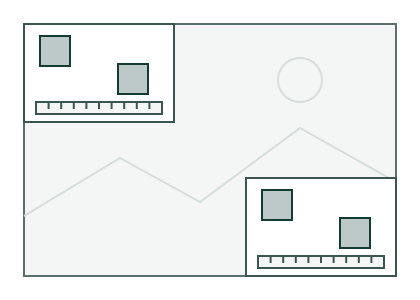
Way A. With a card mask
- Cut two square windows in a sheet of stiff card, each about 4 × 4 cm (1.5 in), no smaller than 3 cm (1.2 in).
- Lay the card against one corner of the painting, where the surface is most expressive: thick strokes, cracks, the signature.
- Put the ruler on the card, not on the paint. Put nothing heavy or metal on the painting.
- Photograph the whole painting with the card and the ruler in place.
- Move in and photograph each window so that it fills the frame.
- Move the card to the opposite corner and repeat steps 3–5.
Result: two overall shots and four close-ups.
Way B. With a ruler only
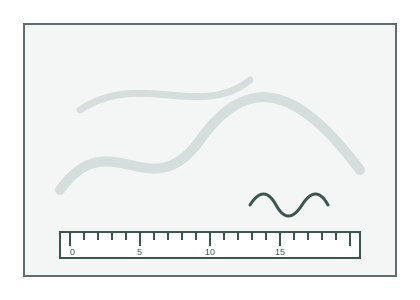
For large paintings, paintings on a wall, and surfaces nothing should touch (pastel, charcoal).
- Choose at least three spots: near two different corners and in the middle. Take the most distinctive ones.
- Hold the ruler beside the spot, close to the surface, without pressing on the paint.
- Photograph the spot close up, with the ruler in the frame and its marks readable.
- Repeat for each spot.
Result: three close-ups or more. Note where each was taken.
What to send
| Shot | How many |
|---|---|
| The whole painting | 1–3 |
| The back and its inscriptions | 1 or more, if the back is easy to reach |
| The signature | 1, if there is one |
| Surface close-ups | way A or way B |
The upload form takes 5 to 15 photographs per object. If something does not work, write to us at contact@coart.market and we will help.
See also: how CoArt Market works and how to get paid through Stripe.
CoArt Market Team